
Testimonial to Instagram Post Generator: Convert Reviews Into Engaging Content
Instagram is a visual-first platform where trust is currency. A testimonial to Instagram post generator gives you the ability to turn authentic customer reviews into beautifully designed posts that stop the scroll and build instant credibility. Whether you run a local salon, an e-commerce brand, or a B2B agency, testimonial content performs exceptionally well on Instagram.
Why Testimonials Dominate Instagram Engagement
Instagram users are bombarded with polished brand content every time they open the app. What cuts through the noise? Authenticity. A testimonial post feels like a recommendation from a friend, not an ad from a company.
When you convert a testimonial into a post, you are doing three things simultaneously: providing social proof, creating visually appealing content, and giving your audience a reason to trust you before they ever visit your website.
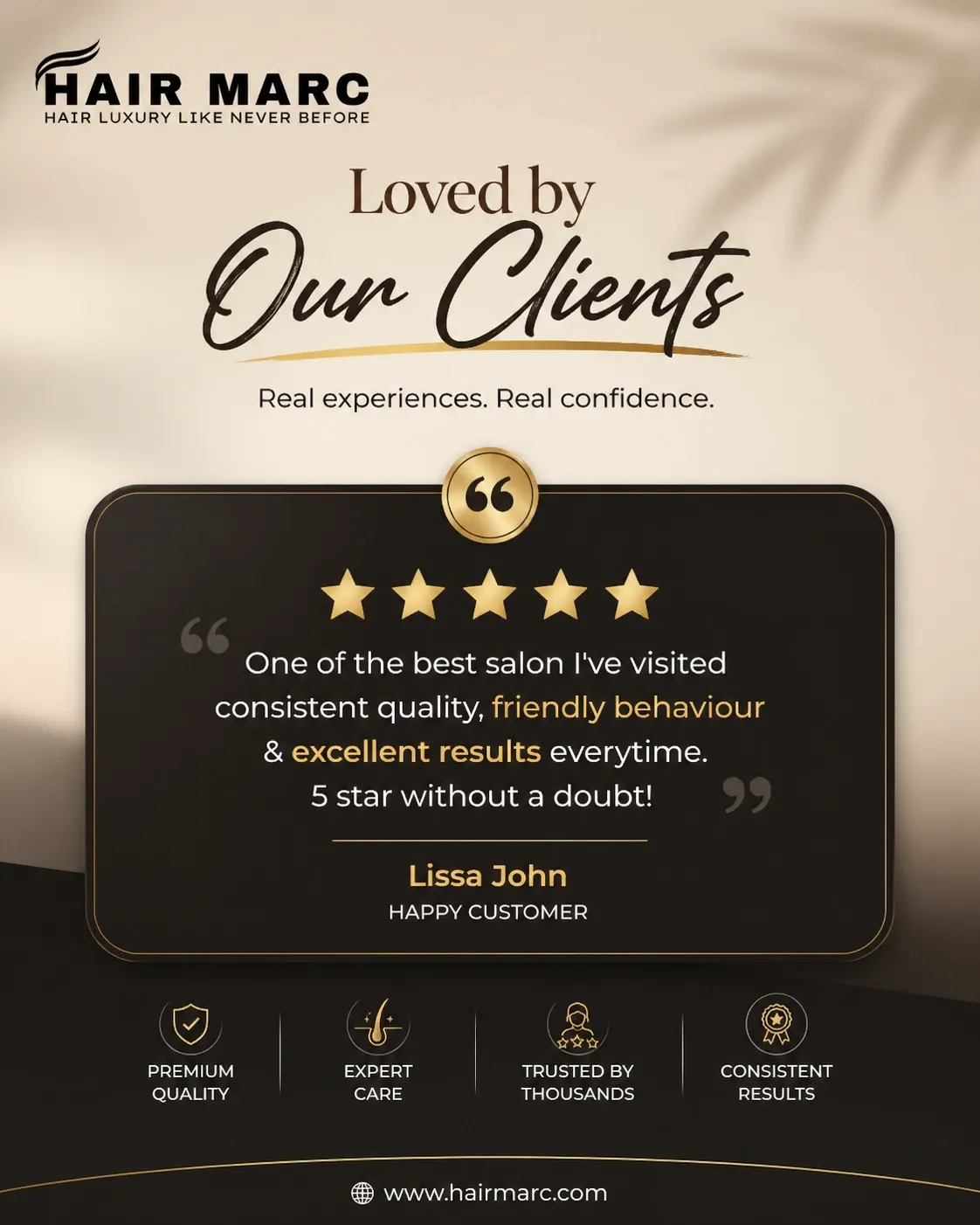
A customer testimonial automatically styled into a branded Instagram post.
What Makes a Great Instagram Testimonial Post?
Not all testimonial posts are created equal. The best ones follow a specific formula that maximizes both aesthetics and persuasion:
The review text must be large, readable, and well-spaced. Instagram users scroll fast. If they cannot read the quote in under two seconds, they will keep scrolling.
Five gold stars immediately signal quality. Even a 4-star review can work if the text is compelling. The visual rating creates instant context.
Include the reviewer's first name and optionally their business or location. "Sarah from Austin" feels more real than "Happy Customer."
The post should look like it belongs to your brand. Your colors, fonts, and logo should be present without overpowering the testimonial itself.
How to Convert Reviews Into Posts for Instagram
Using an AI tool to convert reviews into posts is the fastest way to create testimonial content at scale. Here is the exact process:
Import Reviews From Google Maps
Paste your Google Maps business link to pull all your reviews automatically. The system captures reviewer names, star ratings, and full review text. No manual copying needed.
Select the Perfect Review
Filter by 5-star ratings or search for specific keywords. Want to promote a particular service? Search for it and find reviews that mention it directly.
Generate Your Branded Post
Choose 1:1 square format for feed posts or 4:5 portrait for maximum real estate. The AI designs the testimonial card with your brand identity baked in.
Instagram-Specific Testimonial Strategies
Once you have the ability to generate social media posts from testimonials, you need a strategy for how to use them. Here are proven tactics that work specifically on Instagram:
- Create a Reviews Highlight. Save your best testimonial posts to a permanent Instagram Highlight. New visitors will see social proof immediately when they visit your profile.
- Mix with other content types. Do not post only testimonials. Aim for a 3:1 ratio of value content to social proof. This keeps your feed balanced and prevents audience fatigue.
- Use Stories for quick hits. Shorter testimonials work great as Instagram Stories. The ephemeral nature makes them feel casual and authentic.
- Tag the reviewer if possible. If the customer follows you on Instagram, tag them in the post or Story. They will likely reshare it, exposing your brand to their network.
Cross-Platform: From Instagram to Facebook and LinkedIn
The same review can fuel content across every platform. A testimonial to Instagram post generator that supports multi-platform output lets you repurpose one review into three distinct posts:
Square or portrait format with bold typography and star ratings. Keep the caption conversational and emoji-friendly.
Landscape format works best here. The Facebook post generator AI adapts the design for Facebook's algorithm, favoring content that drives comments and shares.
Professional, text-forward design with subdued colors. The LinkedIn post generator AI optimizes for B2B credibility and professional tone.
AI Caption Generation for Testimonial Posts
A beautiful graphic is only half the battle. The caption is where you add context, express gratitude, and guide the reader toward action. An AI social media caption generator analyzes the review content and writes captions that feel natural, not robotic.
For example, if a review mentions your fast delivery, the AI might write: "Nothing makes us happier than hearing stories like Sarah's. Fast, reliable service is not just a promise, it is what we deliver every single day. Thank you for trusting us!"
This level of contextual awareness is what separates a good testimonial post from a great one.
Measuring the Success of Testimonial Content
Track these metrics to understand how well your testimonial posts are performing:
- Save rate. High saves indicate your audience finds the content valuable enough to revisit later.
- Share rate. Testimonials get shared more than promotional content because people love recommending good businesses.
- Profile visits from post. If your testimonial posts drive profile visits, they are working. That is the first step toward a conversion.
Generate Your First Testimonial Post
Import your Google Maps reviews and create branded testimonial posts for Instagram, Facebook, and LinkedIn in seconds.
Try Testimonial StudioFrequently Asked Questions
Can I use testimonial posts for Instagram Ads?
Yes. Testimonial graphics perform exceptionally well as Instagram ad creatives because they feel organic rather than promotional. Lower CPMs and higher engagement are common.
How often should I post testimonials?
Aim for one to two testimonial posts per week. Any more and your feed starts to feel like a review site. Any less and you are leaving social proof on the table.
Do I need permission to share customer reviews?
Reviews posted publicly on Google Maps are generally fair game for resharing. For private feedback or direct messages, always ask permission first. When in doubt, reach out.
Will all my posts look the same?
No. While the brand framework stays consistent (colors, fonts, logo), the AI varies layouts, quote styling, and accent elements based on the review length and content. Every post feels fresh.