
Best AI Social Media Post Generator for Small Businesses (2026 Comparison)
Finding the best AI social media post generator is not about picking the most popular tool. It is about finding the one that solves your specific problem. If you are a small business owner juggling marketing alongside everything else, you need a tool that goes beyond templates and actually understands your brand.
We tested and compared the top platforms side by side. This guide covers pricing, features, pros, cons, and the exact use case each tool serves best.
How We Compared These Tools
Every tool below was used to complete the same job: take a small business with a website and a product catalogue, and produce one week of on-brand social content — images and captions — ready to publish. We judged each on five things:
- Time from signup to first usable post. Not the first generated post; the first one you would actually publish without further editing.
- Brand fidelity without manual setup. Whether the tool picks up your colours, fonts, and tone on its own, or expects you to configure a brand kit by hand.
- Whether images and captions come from the same system. Tools that generate only text leave you doing the harder half of the work elsewhere.
- Real product data. Whether the output can reference what you actually sell, with accurate names and prices.
- Cost at the tier a small business would realistically buy — not the headline free plan, and not the enterprise tier.
Pricing moves frequently in this category. The figures below reflect published pricing at the time of writing; check the vendor's current page before making a decision.
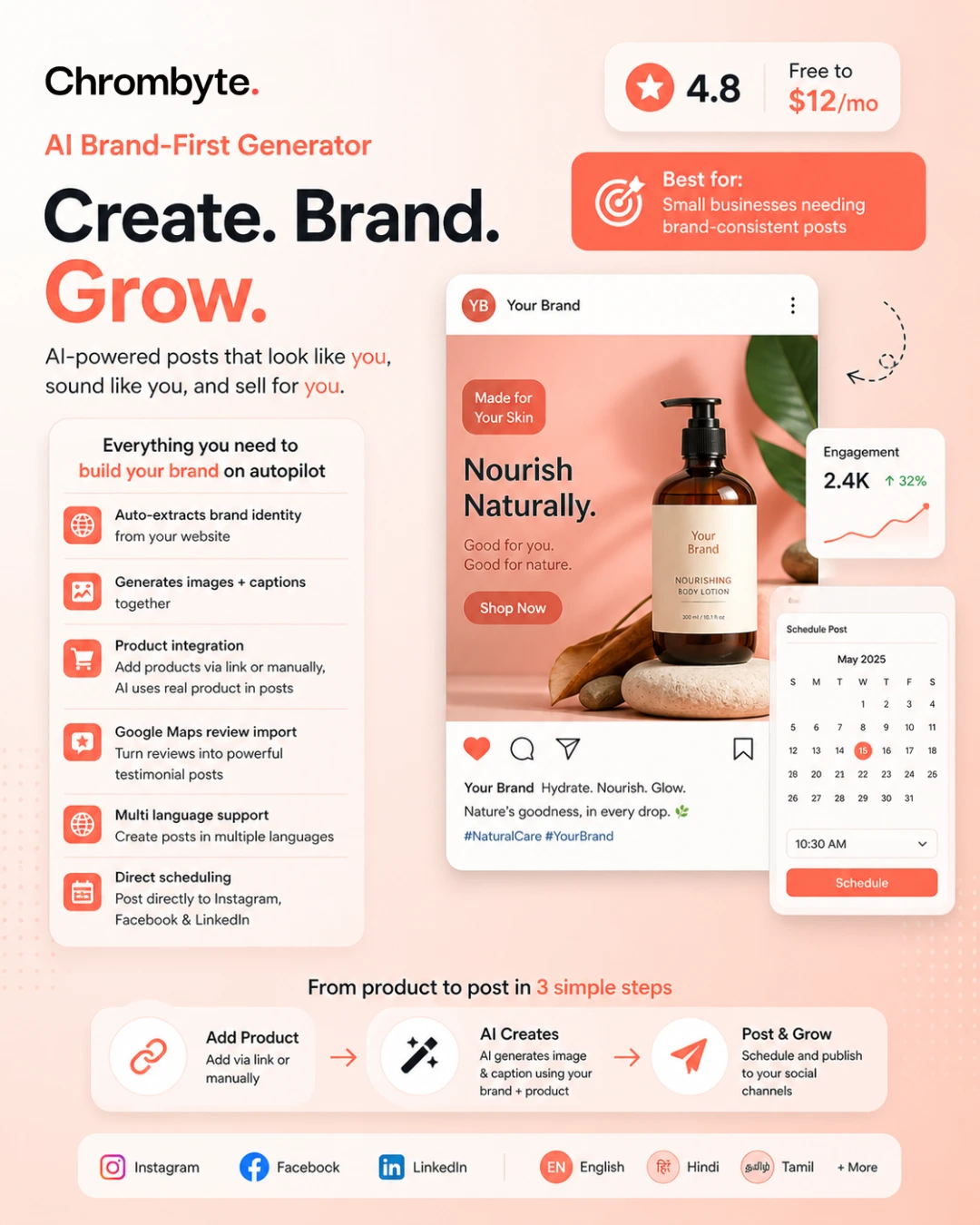
An AI-generated social media post that automatically matches brand colors, fonts, and identity.
Quick Comparison Table
| Tool | Price | AI Posts | AI Captions | Brand Identity | Scheduling |
|---|---|---|---|---|---|
| Chrombyte | $0-12/mo | Yes | Yes | Yes | Yes |
| Predis AI | $19-212/mo | Yes | Yes | No | No |
| Canva | $5-15/mo | No | No | No | No |
| Buffer | $6-120/mo | No | No | No | Yes |
| Jasper AI | $69-125/mo | No | Yes | No | No |
Product Integration: A Feature No Competitor Offers
Chrombyte is the only platform that lets you integrate your actual products directly into AI-generated posts. Here is how it works:
Paste any product URL from your website or e-commerce store. Chrombyte automatically scrapes the product name, description, price, and images. The AI then generates a post that features the real product with accurate details.
No website? No problem. Enter product details manually — name, price, description, and upload a product photo. The AI uses this data to create posts that showcase your actual offerings.
When you generate a post, the AI references your product catalog. It knows your prices, features, and descriptions. This means every post is factually accurate and directly tied to what you sell. No generic placeholder content.
None of the competing tools — Canva, Buffer, Jasper, or Predis — offer product integration. They generate generic posts that you must manually customize for each product. Chrombyte eliminates that step entirely.
Detailed Reviews
Chrombyte — 4.8/5
AI Brand-First Generator — Free to $12/mo
Best for: Small businesses needing brand-consistent posts
Pros:
- Auto-extracts brand identity from website
- Generates images + captions together
- Product integration — add products via link or manually, AI uses real product in posts
- Google Maps review import for testimonials
- Indian language support
- Direct scheduling to Instagram, FB, LinkedIn
Cons:
- Newer platform
- Smaller template library than Canva
Canva — 4.5/5
Design Template Tool — $5-15/mo Pro
Best for: Designers who want full creative control
Pros:
- Massive template library
- Advanced design features
- Video editing capabilities
- Team collaboration tools
Cons:
- No AI caption generation
- No brand identity extraction
- Manual design process
- Requires design skills
Buffer — 4.3/5
Social Media Scheduler — $6-120/mo
Best for: Scheduling and analytics
Pros:
- Excellent scheduling features
- Strong analytics dashboard
- Multi-platform management
- Team workflow tools
Cons:
- No AI content generation
- No image creation
- Requires external design tools
- Caption writing is manual
Jasper AI — 4.2/5
AI Copywriting Tool — $69-125/mo
Best for: Long-form content and copywriting
Pros:
- Powerful text generation
- Multiple AI models
- SEO optimization features
- Enterprise-grade features
Cons:
- Expensive for small businesses
- No image generation
- No brand identity integration
- Overkill for simple social posts
Predis AI — 4.0/5
AI Content Generator — $19-212/mo
Best for: Quick AI-generated carousels
Pros:
- Fast carousel generation
- Multiple content formats
- Competitor analysis
- Idea generation
Cons:
- Limited brand customization
- No website crawling
- No testimonial features
- Higher starting price
Other Tools Worth Knowing About
These did not make the main comparison because they solve adjacent problems, but they come up often enough to be worth placing:
- Later — strongest on visual planning for Instagram. A genuine grid preview and a solid link-in-bio product, but content creation is not its focus.
- Hootsuite — built for teams managing many accounts with approval workflows. Powerful, priced for organisations rather than solo operators.
- Metricool — the best analytics of the group at a modest price, and increasingly capable at scheduling. Content generation is secondary.
- Ocoya — closest in ambition to an all-in-one AI generator, combining copy and visuals with e-commerce integrations.
- Simplified — a broad design-and-write suite. Wide feature surface, less depth on brand consistency specifically.
If your bottleneck is distribution — many accounts, many approvals — look at Hootsuite or Buffer. If your bottleneck is analytics, Metricool. If it is creating the content in the first place, that is what the tools in the main table above are competing on.
What Actually Matters When You Choose
Feature lists are easy to pad. In practice, four things determine whether a tool survives past month two:
Does it learn your brand, or do you have to teach it? Most tools offer a "brand kit" you populate manually — upload a logo, enter hex codes, pick fonts. That is fine once. The tools that hold up are the ones that read your existing website and infer the identity, because the manual version quietly stops being maintained.
Does one system produce both the image and the caption? A text generator plus a separate design tool means you are still the integration layer, copying between two apps for every post. That is where the time goes.
Can it reference what you actually sell? Generic posts about "our products" convert poorly. A tool that knows your catalogue — real names, real prices, real photos — removes the customisation step that eats the time you saved.
What does it cost at the tier you would actually use? Free tiers are usually demos. Compare the plans that permit commercial use with enough monthly generations to post two to four times a week, which is the realistic minimum cadence.
Everything else — template count, number of supported platforms, AI model branding — matters far less than these four.
Frequently Asked Questions
What is the best AI social media post generator for a small business?
For most small businesses the deciding factor is whether the tool produces images and captions together while holding brand consistency without manual setup. That is what Chrombyte was built for, and it is the cheapest option here that does all three. If you need heavy scheduling across many accounts, pair a generator with Buffer instead.
Is there a genuinely free AI post generator?
Several tools have free tiers, but most cap generations low enough to function as a trial. Our guide to free social media post generators covers which free plans are actually usable for ongoing posting and which are demos.
Can AI generators match my exact brand colours and fonts?
The better ones can. The distinction is between tools that generate an image and tools that generate a branded layout — the latter apply your palette and typography as constraints rather than suggestions. We explain the difference in our guide to creating branded social media content with AI.
Do I still need Canva if I use an AI generator?
Often no, but they serve different jobs. An AI generator is for volume and consistency; Canva is for one-off pieces where you want control over every pixel. Many small businesses keep Canva for occasional custom work and use a generator for the weekly cadence.
Will AI-generated posts hurt my engagement?
Not inherently. Engagement tracks relevance, not authorship. Posts fail when they are generic — which is a briefing and editing problem, not an AI problem. Our gallery of 15 AI-generated posts that actually work shows unedited output for comparison.
How long does it take to produce a week of content?
With a tool that handles images and captions together and already knows your brand, a week of posts takes roughly 15 to 30 minutes including editing. With a text generator plus a separate design tool, budget two to three hours.
Which Tool Should You Choose?
You want an all-in-one AI tool that actually understands your brand. It auto-extracts your identity, uses real product data, turns reviews into testimonials, supports Indian languages, and lets you create + schedule posts in one place no design skills needed.
You have design experience and want full creative control over every pixel. Canva is unmatched for custom designs but requires manual work for every post.
You already have content created elsewhere and just need the best scheduling and analytics platform. Buffer does not create content, it distributes it.
You need enterprise-grade copywriting for blogs, ads, and long-form content. Jasper is overkill for simple social media posts but powerful for complex writing tasks.
Pricing Comparison
For small businesses, pricing is often the deciding factor. Here is how the top platforms compare:
Chrombyte is the most affordable option that still offers AI image generation, caption writing, and brand identity extraction. At $12 per month for the Premium plan, it is less than a fifth of Jasper's price while offering more social-media-specific features.
Related Guides
- AI Content Creator Advantages — Why AI tools help small businesses with marketing.
- Free Social Media Post Generator — Best free tools and demos without paying.
- How to Use AI Social Media Tools — Step-by-step tutorial for beginners.
- Indian Language Support — Create posts in Hindi, Tamil, Marathi, and more.
Try the Best Generator Free
Join 1,000+ small businesses using Chrombyte to generate brand-consistent social media posts in seconds.
Start Free Trial